Apply for a Building Permit

Most structural work requires a permit. See what requires a permit in Osceola County.

Preparation

Ensure you have the below information ready:

  • Address - If your permit requires a new address, contact our 911 Addressing Office at 407-742-5911
  • Parcel - Find your parcel ID by searching your address on the Property Appraiser's search tool
  • Owner & contractor information
  • Building Plans - Digitally signed & sealed by an architect/engineer if submitting online
  • Product Approvals - Florida Product Approval sheets if work involves windows, doors, roofing, shutters, panel walls & structural components

Quick Permits

Residential roofing, re-roofing, A/C change-outs, and water heater/plumbing change-outs can be issued immediately online or over-the-counter, and only require the Florida product approvals.

Owner-Builder Permits

Owners/Builders who choose to act as their own contractors cannot apply online. Instead, they must complete the Owner Builder Statement Affidavit along with their permit application, and deliver it to our Permitting Office in person or by mail.

Online

Step 1.Login to permits.osceola.org

Login to your account on our Permit Center, permits.osceola.org. If you don't have an account, create one.

Step 2.Begin the application

1. Select New > Building Application.

apply-permit-new-building-application


2. Choose the Record Type that relates to your work (see table below).

apply-permit-select-type

Record Type Activity
Building Permit Building/construction projects including single-family homes, additions, windows/doors, fences, sheds, gazebos, pergola, trellises, screen rooms, pool enclosures, pool installation, solar PV system installation, interior build-outs, irrigation, and similar building scopes
Plumbing Permit Water heater replacement, re-pipes, fixture changes that involve re-pipes, and similar plumbing-only scope
Roofing Permit Re-roofing and roof replacement
Electrical Permit New/replacement solar panels, outlets/circuits, EV chargers, sub-panels, signage hookups, and low-voltage changes
Mechanical Permit HVAC work: A/C or furnace change-outs, exhaust fans, new mechanical equipment, like-for-like replacements
Gas Permit Gas tanks, running or relocating gas piping
Slab-Only Permit Concrete slabs, footers
Demolition Permit Demolitions of building structures, pools, sheds/gazebos, carports, commercial signs

Step 3.Upload plans and documents

On the last step of your application process, you can upload plans and documents. Watch our video guide for the exact steps on how to upload files for your permit.

apply-permit-upload-plans

Step 4.Plan Review

Once submitted, your permit will undergo plan review. Residential permits usually take 3–5 business days, and Commercial projects typically take about 2–4 weeks. Updates are automatically sent to your registered email address.

You can check the status of your permit using the steps here.

Step 5.Inspections

After your permit is issued, you can download your Permit Card from permits.osceola.org. You must print this card and post it in a visible spot at the job site.

For jobs valued at over $5,000, you must notarize and record a Notice of Commencement (NOC) and post it on the job site. For specific NOC steps, see our Building Office FAQs.

apply-permit-card

Schedule a building inspection

Step 6.Completion

After your final inspection is approved and fees are paid, your permit is ready to be closed. See below for Certificate of Completion & Certificate of Occupancy steps.

Paper

Step 1.Submit paper application

Download & complete the appropriate form(s) from our Permit Applications page.

  • Each plan sheet must be signed and sealed by the design professional. We cannot accept printed versions of digitally certified signatures.
  • We no longer require 3 copies. Only submit one (1) set of plans to our office.

Drop off or mail your paper plans to:

Permitting Department
1 Courthouse Square
Suite 1400
Kissimmee, FL 34741

Step 2.Plan Review

Once received, your permit will undergo plan review. Residential permits usually take 3–5 business days, and Commercial projects typically take about 2–4 weeks. Updates are automatically sent to your registered email address.

You can also check the status of your permit using the steps here.

Step 3.Inspections

After your permit is issued, you can download your Permit Card from permits.osceola.org. You must print this card and post it in a visible spot at the job site.

For jobs valued at over $5,000, you must notarize and record a Notice of Commencement (NOC) and post it on the job site. For specific NOC steps, see our Building Office FAQs.

apply-permit-card

Schedule a building inspection

Step 4.Completion

After your final inspection is approved and fees are paid, your permit is ready to be closed. See below for Certificate of Completion & Certificate of Occupancy steps.

After your final inspection is approved and fees are paid, your permit is ready to be closed. 

Certificate of Completion

Certificates of Completion are given for minor structures with no occupancy, such as fences, re-roofs, sheds, or pools. Your permit status will change to Final, and you can download the document from your permit page under Reports > Certificate of Completion.

apply-permit-reports-certificate-of-completion

Certificate of Occupancy (CO)

COs are given for homes or commercial building where there will be occupancy. They are issued once final inspection has been approved and no violations are found to the provisions of the building codes, life safety and applicable laws. Typically a CO is issued 1-2 business days after the power call is processed. Your permit status will change to CO, and you can download the document from your permit page under Reports > C of O.
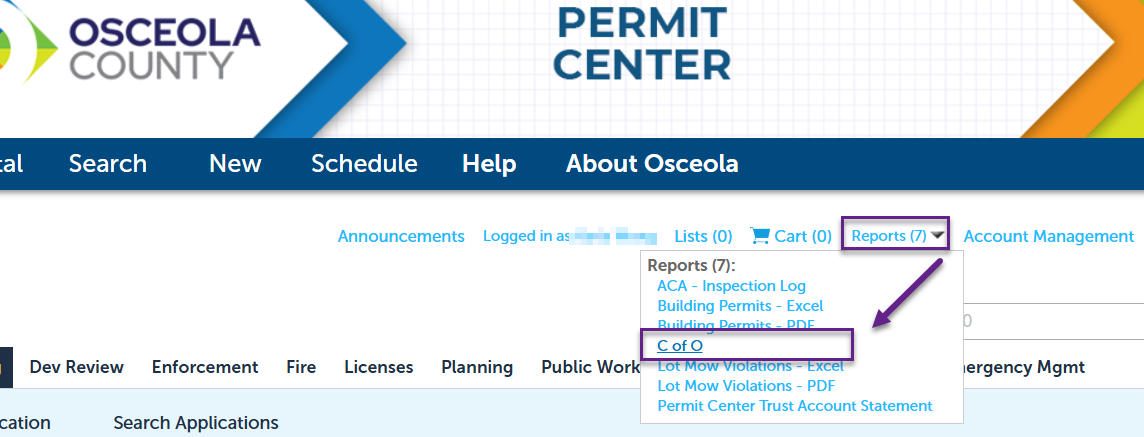
Download Certificate of Occupancy - step 2. Click Reports > C of O.

Full Certificate of Occupancy guide